What Is Shared Planner and How Does It Work?
Keeping track of everyday life isn't always easy. Between work schedules, family activities, appointments, shopping lists, and messages, important information can end up scattered across several different apps.
A calendar might hold your appointments. A notes app might contain your grocery list. Messages about weekend plans might be buried in a group chat.
Shared Planner brings calendars, tasks, shopping lists, reminders, and group communication together in one place.
Whether you're organizing your own schedule, coordinating family responsibilities, or planning activities with friends or coworkers, Shared Planner helps everyone stay organized and connected.
What Is Shared Planner?
Shared Planner is a planning and organization app available for iPhone, Android, and the web.
It combines several everyday tools into one application:
- Shared calendars: Keep track of events, appointments, and activities.
- Tasks and to-do lists: Create lists, assign responsibilities, and track completed items.
- Shopping lists: Keep grocery and shopping lists organized and accessible to group members.
- Group chat: Communicate with the people you're planning with.
- Reminders: Stay informed about upcoming events and responsibilities.
- Private groups: Organize different parts of your life without mixing everything together.
One of the most useful aspects of Shared Planner is its flexibility. You can use it entirely on your own or connect with other people through shared groups.
How Does Shared Planner Work?
Shared Planner is built around two simple ideas: personal planning and shared planning.
Every user creates their own account, with their own profile and personal planning space.
From there, they can create groups, invite others to join, or join groups that someone else has created.
Let's look at how that works.
1. Everyone Has Their Own Account
When you sign up for Shared Planner, you create your own account.
Your account belongs to you, even if you use the app primarily with your spouse, family, or coworkers.
For example, a husband and wife would each create a separate account. They can then join the same family group while maintaining their own profiles and personal schedules.
This makes it possible to collaborate without sharing passwords or using someone else's account.
2. You Can Plan Your Own Life Privately
You don't need to create or join a group to use Shared Planner.
You can use your personal planning space to manage:
- Appointments and personal events
- Daily tasks and to-do lists
- Reminders
- Personal shopping lists
Personal items stay separate from your shared group activities.
This means Shared Planner can serve as your everyday personal organizer, even when you're not coordinating with anyone else.
3. Create Groups for Different Parts of Your Life
Groups are what make Shared Planner particularly useful for coordinating with others.
You can create different groups for different purposes, such as:
- Family
- Friends
- Work
- Community activities
- Volunteer teams
- Events and special occasions
Each group has its own shared planning space.
For example, you might have a family group for household schedules, a friends group for weekend activities, and a work group for team responsibilities.
Information stays organized within the appropriate group instead of becoming mixed together.
4. Invite People to Join Your Groups
After creating a group, Shared Planner provides an invitation code.
You can share that code with the people you want to invite.
They create or sign in to their own Shared Planner accounts, open Groups, choose Join, and enter the invitation code.
Once they join, they can participate in that group's shared planning activities.
You can also join groups created by other people.
You don't have to be the creator of every group you belong to.
For example, one spouse can create a family group, while the other creates a separate group for friends. Both can participate in the family group while managing their other groups independently.
5. Keep Everyone Updated With Shared Calendars
A shared calendar helps group members see upcoming events and activities in one place.
Imagine a family coordinating:
- School activities
- Doctor appointments
- Sports practices
- Family gatherings
- Weekend plans
Instead of relying on scattered text messages or repeatedly asking about schedules, family members can check their shared calendar.
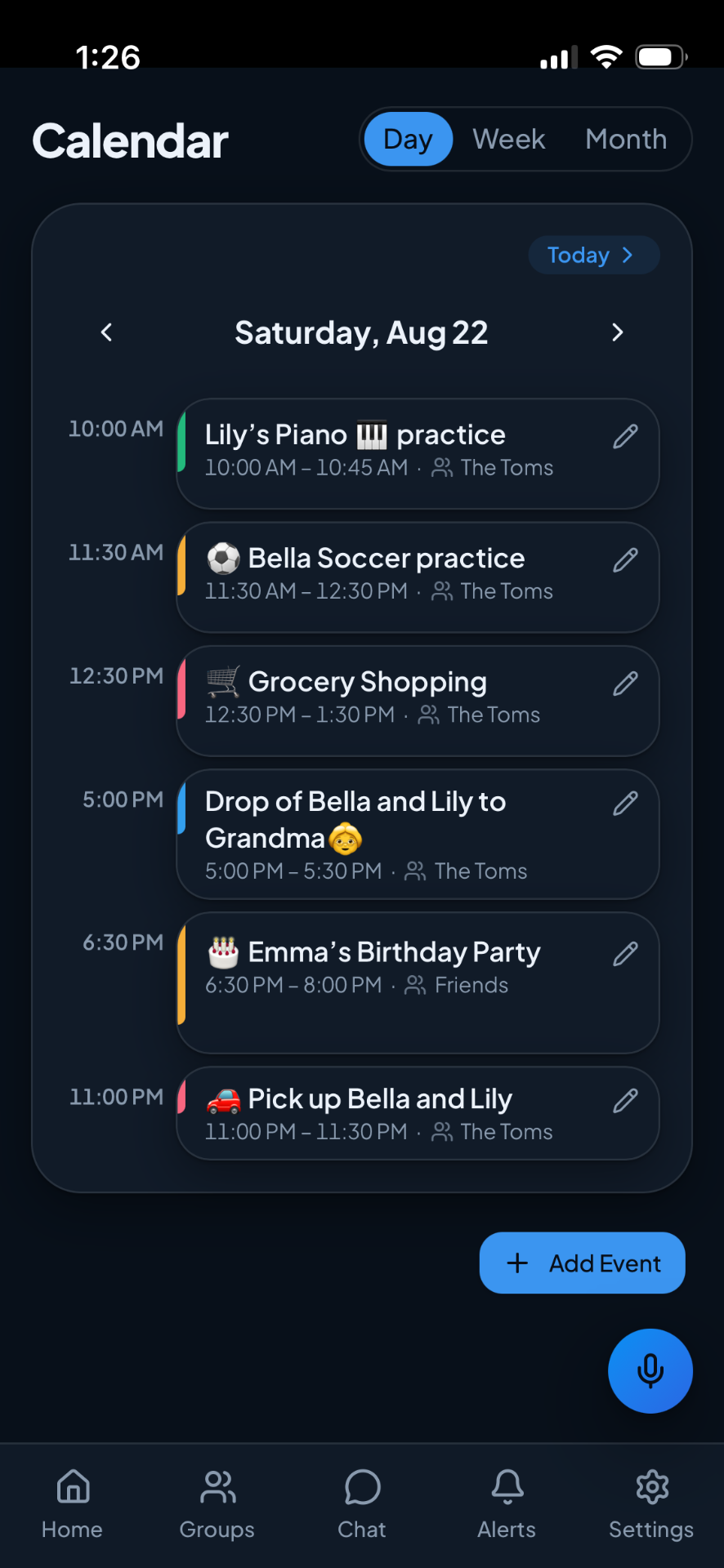
Shared Planner also supports personal events, so not everything needs to be visible to a group.
For more ideas, see how to organize your family schedule in one place.
6. Organize Responsibilities With Tasks and Lists
Planning isn't only about knowing when something happens. It's also about knowing what needs to get done.
With Shared Planner, you can create task lists and assign responsibilities to group members.
For example, when preparing for a family gathering, a shared list might include:
- Buy groceries
- Prepare the backyard
- Pick up decorations
- Confirm the guest list
Group members can see the responsibilities and mark items complete.
This helps everyone understand what has been done and what still needs attention.
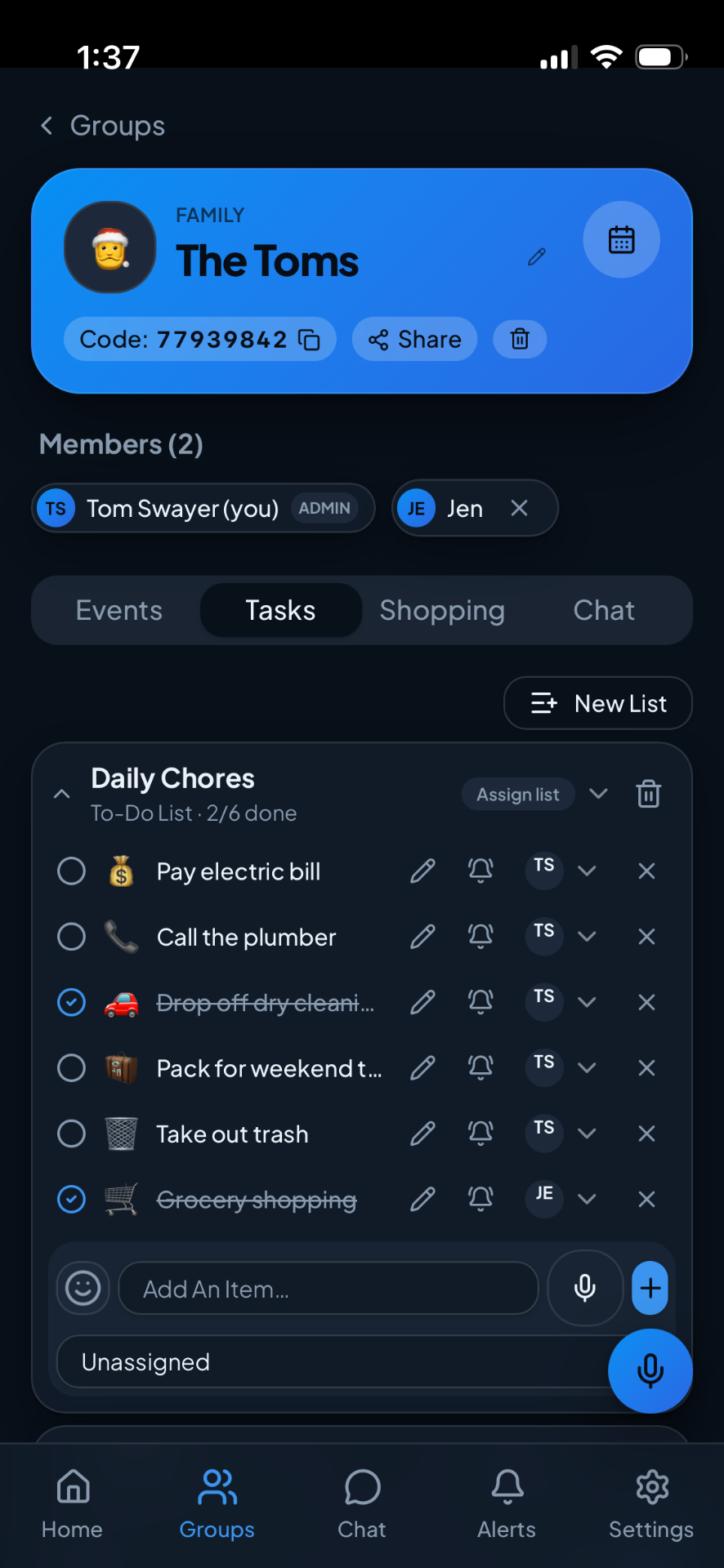
Planning chores at home? Read how to create a family chore system that actually works.
7. Share Shopping Lists Without Constantly Texting
Shopping lists are another practical part of Shared Planner.
Imagine your spouse is at the grocery store and you remember that the family needs milk.
Instead of sending another message that might get lost, you can update the group's shared shopping list.
The updated list becomes available to group members, helping everyone work from the same information.
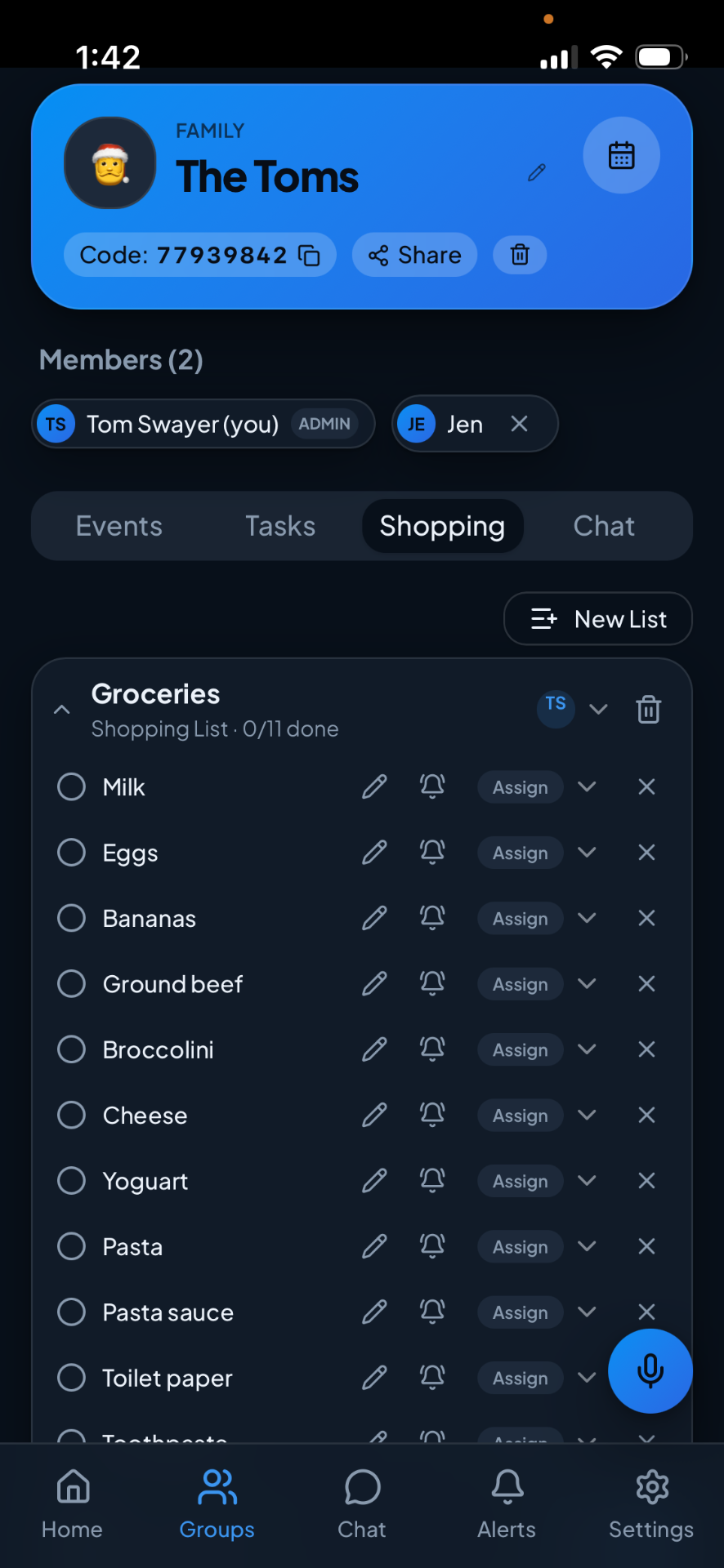
Shared shopping lists can be useful for groceries, household supplies, party preparations, and other purchases.
8. Communicate Through Group Chat
Shared Planner also includes group messaging.
Members can discuss plans, ask questions, and share supported photos or documents within their groups.
For example, a family might use its group chat to discuss dinner plans while keeping the grocery list and calendar in the same app.
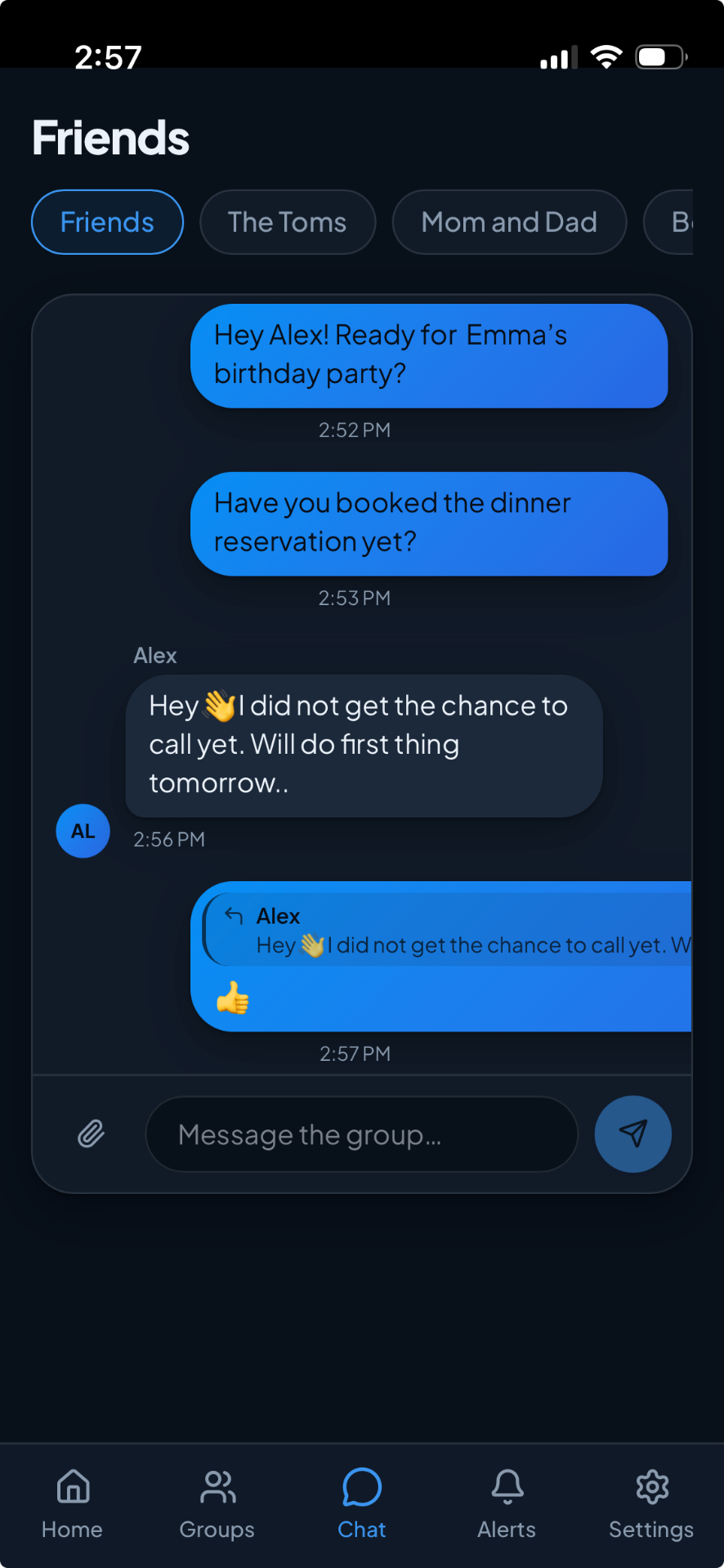
Group chat supports notifications, subject to device permissions and notification delivery, so members can stay informed about new messages.
Rather than switching between several unrelated tools, users can keep planning and communication connected.
Can You Belong to Multiple Groups?
Yes. Shared Planner allows users to participate in multiple groups, subject to their subscription plan's limits.
Consider this example:
Sarah's groups:
- Family
- Book Club
- Neighborhood Friends
David's groups:
- Family
- Basketball Friends
- Work Team
Sarah and David share the Family group, but their other groups are separate.
Each person can manage their own planning activities while collaborating where needed.
This flexibility makes Shared Planner useful beyond a single household calendar.
Who Can Use Shared Planner?
Shared Planner is designed for different kinds of people and groups.
Families
Coordinate school schedules, appointments, household responsibilities, shopping lists, and family events.
Couples
Keep shared plans organized while maintaining separate personal schedules and profiles. See shared calendars for couples.
Friends
Organize trips, gatherings, celebrations, and other group activities.
Small Teams
Coordinate tasks, events, and group communication without relying on scattered conversations.
Community Groups and Organizations
Keep activities, responsibilities, and communication organized among members.
Individuals
Manage personal appointments, tasks, reminders, and lists without joining a group.
How Is Shared Planner Different From Using Separate Apps?
Many people already use calendars, messaging apps, notes, and task managers.
The challenge isn't necessarily that those tools don't work. It's that information can become scattered across them.
For example, an event might be saved in one calendar, the shopping list in another app, and the conversation about who's responsible in a messaging thread.
Shared Planner is designed to bring these related activities together.
Instead of treating calendars, tasks, lists, and conversations as separate activities, it provides a shared space where people can coordinate them.
That doesn't mean every person needs to abandon their existing tools. Shared Planner simply offers a more connected way to organize everyday plans. For one comparison, see Shared Planner vs. Cozi.
Is Shared Planner Free?
Shared Planner offers a free way to get started, along with paid plans for users who need additional capabilities or higher limits.
Available features and limits depend on the selected plan.
You can review the current options on the Shared Planner plans and pricing page.
How Do You Get Started With Shared Planner?
Getting started is straightforward:
- Download Shared Planner on your iPhone or Android device, or visit the website.
- Create your personal account.
- Start organizing your personal calendar, tasks, and reminders.
- Create a group if you want to coordinate with others.
- Share the group's invitation code with family members, friends, or teammates.
- Start planning together using shared events, tasks, shopping lists, and group chat.
Remember, everyone should create their own account rather than sharing login credentials.
Have more questions? Visit the Help Center.
Frequently Asked Questions
Does everyone in my family need a separate account?
Yes. Each family member who wants to use Shared Planner should have their own account. They can then join the same family group.
Can I use Shared Planner without creating a group?
Yes. You can manage personal events, tasks, and reminders without joining any groups.
Can I create more than one group?
Yes. You can create and join multiple groups, subject to your plan's limits.
Can my spouse create their own groups?
Absolutely. Each person can create their own groups and join groups created by other people.
Can other group members see my personal events?
Personal events remain separate from group events. Group members can see the information shared within their groups.
Does Shared Planner include messaging?
Yes. Shared Planner includes group chat for communicating with members of your groups. It is not a private one-to-one messaging service.
Can I use Shared Planner on iPhone and Android?
Yes. Shared Planner is available on both platforms and can also be accessed through the web.
Start Planning Together
Staying organized shouldn't require juggling multiple apps, searching through old messages, or constantly reminding everyone about upcoming plans.
Shared Planner brings everyday planning and group communication into one connected space.
Whether you're organizing your own day or coordinating activities with the people who matter to you, Shared Planner helps make planning simpler.
Plan life together, perfectly in sync.